Blog
What Is PD Charging and How Does It Work?
Updated on Jul 2026
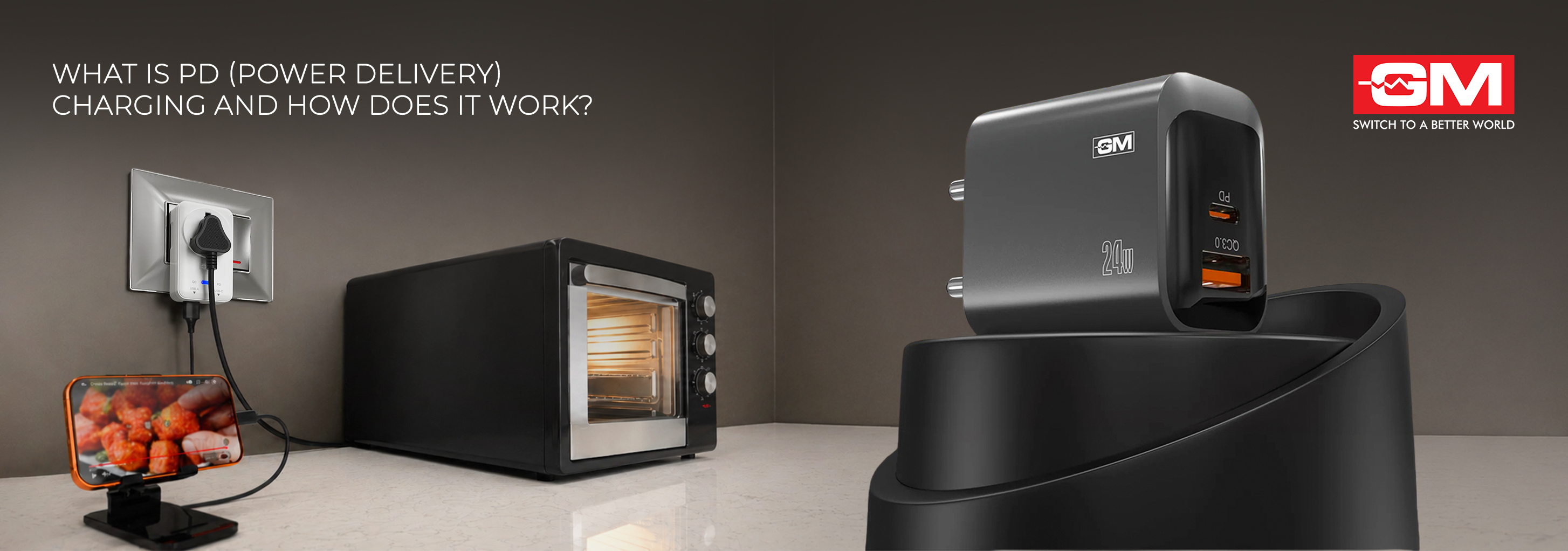
What Is PD (Power Delivery) Charging and How Does It Work?
Here’s a myth worth clearing up early. A higher wattage number on a charger doesn’t automatically charge your phone faster. What really decides your charging speed is a quiet conversation between your charger and your device, and that conversation is the heart of PD charging. So, what is PD charger, and why is it now standard on modern phones, tablets, and laptops? Let’s break it down in plain terms.
What Is a PD Charger?
PD stands for Power Delivery, a fast-charging protocol that lets a charger and a device talk to each other and agree on the right amount of power. So what is PD in charger terms doing exactly? Instead of pushing a fixed voltage into every gadget, a power delivery charger adjusts its output to suit whatever is plugged in, whether that's a small pair of earbuds or a power-hungry laptop.
It helps to clear up one common mix-up. USB-C is the connector, the oval-shaped plug you physically insert. PD is the protocol, the set of rules that manages how power flows through that connector. They often work together, but they aren’t the same thing.
To see why PD matters, look at what came before. Older USB charging was slow, delivering only around 7.5 watts, and even a plain USB-C cable without PD typically handles about 15 watts. PD charging changed that entirely, opening the door to far higher and smarter power levels.
How Does PD Charging Work?
The magic of PD charging is negotiation. When you connect a device, the charger and the device exchange messages through a dedicated communication line inside the USB-C connection (called the CC, or Configuration Channel). The actual power travels along a separate line, so power and communication stay neatly separated.
Here’s how that conversation typically unfolds:
-
The charger advertises what it can offer, listing the voltage and current combinations it supports.
-
The device reviews these options and requests the best match for its needs at that moment.
-
Once both sides agree, the charger adjusts its output and power begins to flow safely.
This back-and-forth repeats as charging progresses, which is why a PD charger charges quickly early on, then eases off as your battery fills. PD is also bidirectional, so power can flow both ways: with the right setup, one phone can even charge another.
Will a PD Charger Power My Phone and My Laptop?
For most people, this is the real question, and the answer is usually yes. What matters is the power level, not the version number printed on the box.
-
Phones and tablets need relatively little power, so almost any PD charger handles them comfortably.
-
Everyday laptops (ultrabooks and most business machines) generally charge fine on chargers up to 100 watts, which covers the vast majority of USB-C laptops.
-
High-performance laptops, such as gaming or workstation models, can need more. Newer PD chargers support Extended Power Range (EPR), which pushes output up to 240 watts for these demanding machines.
There’s one catch. To carry more than 100 watts safely, you need a USB-C cable specifically rated for that power (an EPR cable). A regular USB-C cable is fine for phones and standard laptops, but it won’t unlock the highest speeds on a high-power machine.
Why PD Charges Safely and Efficiently
Speed is only half the story. PD also charges efficiently and protects your device, and a feature called PPS (Programmable Power Supply) is a big reason why. PPS constantly adjusts the power to match what your battery needs at each moment, so less energy is wasted as heat. In simple terms, it helps keep your device cooler, which can support longer battery life.
This is also why raw wattage can mislead. A 100W PD charger doesn’t force 100 watts into a phone; it delivers only what the phone asks for. A bigger number on the box doesn’t automatically mean a faster charge, so matching the charger, cable, and device matters more. Many modern high-wattage chargers also use GaN (Gallium Nitride) technology, which lets them run smaller, cooler, and more efficiently than older designs.
Please note: Always use a good-quality cable rated for the power level you intend to charge at, as an unsuitable cable can affect both safety and performance.
Why Isn’t My Phone Charging at Full Speed?
This is one of the most common frustrations, and it usually comes down to a mismatch somewhere in the chain. If your phone isn’t hitting the speed you expected, check these possibilities:
-
Your cable can’t carry enough current. Many basic USB-C cables support only up to 3A, which limits how much power can pass through.
-
The charger doesn’t support PPS. Some phones need PPS for their fastest charging, and without it they fall back to a slower rate.
-
Your phone has its own ceiling. A phone that maxes out at 25W will only ever draw 25W, even from a 100W charger.
-
The battery is past 80%. Charging naturally slows as the battery fills, to protect its long-term health.
-
Things are getting warm. Phones deliberately reduce charging speed when they heat up, which is normal and protective.
In most cases, a good-quality cable paired with a charger that matches your phone’s supported speed solves the problem.
How to Choose the Right PD Charger
Putting it all together, here are the main factors to consider:
-
Match the wattage to your device. Pick a charger that comfortably covers your most demanding device.
-
Use an EPR-rated cable for high power. Above 100 watts, both the charger and the cable must support it. For most homes, a standard USB Type C PD charger comfortably covers phones, tablets, and everyday laptops.
-
Look for PPS support if you own a modern smartphone, as many rely on it for their fastest, coolest charging.
-
Remember backward compatibility. A PD charger will safely charge older or non-PD devices too, simply at their standard speed.
-
Prioritise safety features such as surge and overload protection, which are especially valuable in Indian homes where voltage fluctuations are common.
A few products fit these needs well. The GM Modular G+ Dual Tone PD Adapter offers 24W fast charging with dual USB-A and Type-C ports, supports PD 3.0, QC 3.0, and PPS, and includes a 60W USB-C to USB-C cable. For higher-powered needs, the G+ PD Data Cable supports up to 100W charging with reinforced connectors built for everyday use.
Also Read: Importance of Spike Guards in Protecting Your Electronic Devices
PD charging isn’t about forcing more power into your device. It’s about a smart, ongoing conversation that delivers the safest, most efficient charge for whatever you plug in. Once that clicks, choosing the right charger and cable gets far simpler than chasing the biggest wattage number. For dependable everyday charging suited to Indian homes, GM Modular’s range of PD charging solutions is a sensible place to start.
Frequently Asked Questions
1. What is a PD charger, and what does PD charger mean?
A PD (Power Delivery) charger is a fast charger that communicates with your device to deliver the right amount of power. So when people ask what is power delivery charger, the simple answer is this: rather than a fixed output, it adjusts intelligently, which allows quicker and safer charging for phones, tablets, and laptops.
2. Is a PD charger the same as a USB-C charger?
Not exactly. USB-C is the physical connector, while PD is the charging protocol that manages power through it. Most PD chargers use USB-C, but a USB-C port alone doesn’t guarantee PD fast charging unless it’s clearly specified.
3. Can I charge my laptop and phone using the same PD charger?
Yes. A PD charger negotiates power with each device, so it can charge a phone gently and a laptop at higher power using the same unit. Just make sure the charger’s maximum wattage comfortably covers your most demanding device.
4. Do I need a special USB-C cable for PD charging?
For phones and standard laptops, a good-quality USB-C cable works well. However, to charge above 100 watts, you need a cable specifically rated for Extended Power Range (EPR), as an ordinary cable can’t safely carry that much power.
5. What makes GM Modular PD chargers a good choice?
GM Modular’s G+ PD range combines fast charging with practical safety features like overcurrent and short-circuit protection. With options spanning adapters, cables, and power strips, they suit everyday Indian homes looking for reliable, efficient charging solutions.
Related Blogs

Bladeless Fan Buying Guide: 10 Checks | GM Modular
Bladeless Fan Buying Guide: 10 Things to Check Before You Buy A bladeless fan looks like the obvious upgrade. No spinning blades, a slim tower, a quiet hum, and a price that hints it must be the better choice. But the word “bladeless” on
Read More
What Is a GaN Charger? A Simple Guide
What Is a GaN Charger? Everything You Need to Know You have probably used gallium nitride for years without knowing it. Before it reached the charger on your wall, this material lit up the first white LEDs, powered blue lasers, and read the discs in
Read More
GM Artic Air 1: 3-in-1 Bladeless Tower Fan
Why the GM Artic Air 1 Is the Ultimate 3-in-1 Appliance for Every Season Picture one slim tower in the corner of your living room. In May, it cools you through a brutal afternoon. In August, it clears the damp, stale air the monsoon leaves beh
Read More
Wireless Charging vs Wired Charging: Which Is Faster?
Wireless Charging vs Wired Charging: Which Is Faster? If your phone is at 10% and you have twenty minutes before heading out, which charger should you grab: the cable or the pad? Wireless charging is everywhere now, yet most of us still reach for a
Read More